
Divi 5
Luntsi is a native Divi 5 module
No iframe, no shortcode workaround. The lunch menu is a Divi 5 module of its own, edited in the Visual Builder like any Divi module: the preview updates instantly, and Divi's design settings, global colours and fonts all work.
Divi's own design settings
The same menu in three styles, zero lines of CSS
Below is the same "Luntsi: Today's lunch" module three times. The differences come only from the Visual Builder's Design tab: background, border, shadow, spacing and the body font. The menu itself updates by itself in every card.
Today's lunch · Monday 23.11.
- Pea soup LG
- Oven pancake with strawberry jam L
- Puréed vegetable soup VEG
Lunch €12.90 · Soup lunch €9.90
Lunch includes salad bar, bread, a drink and coffee
Meat origin: Beef Finland · Pork Finland · Chicken Finland
Today's lunch · Tuesday 24.11.
- Chicken in cream sauce LG
- Rice MG
- Roasted root vegetables VEG
Lunch €12.90 · Soup lunch €9.90
Lunch includes salad bar, bread, a drink and coffee
Meat origin: Beef Finland · Pork Finland · Chicken Finland
Today's lunch · Wednesday 25.11.
- Minced meat sauce LM
- Mashed potatoes LG
- Vegetable lasagne K
Lunch €12.90 · Soup lunch €9.90
Lunch includes salad bar, bread, a drink and coffee
Meat origin: Beef Finland · Pork Finland · Chicken Finland
Today's lunch · Thursday 26.11.
- Salmon soup LG
- Mushroom risotto KG
Lunch €12.90 · Soup lunch €9.90
Lunch includes salad bar, bread, a drink and coffee
Meat origin: Beef Finland · Pork Finland · Chicken Finland
Today's lunch · Friday 27.11.
- Pork loin with brown gravy LG
- Beetroot patties VEG
Lunch €12.90 · Soup lunch €9.90
Lunch includes salad bar, bread, a drink and coffee
Meat origin: Beef Finland · Pork Finland · Chicken Finland
Today's lunch · Saturday 28.11.
Lunch is served on weekdays.
Lunch Mon–Fri 10:30–14:00
- Meatballs and mash L
- Veggie balls VE
Today's lunch · Sunday 29.11.
Lunch is served on weekdays.
Lunch Mon–Fri 10:30–14:00
- Meatballs and mash L
- Veggie balls VE
Today's lunch · Monday 30.11.
- Meatballs and mash L
- Veggie balls VE
Lunch €12.90 · Soup lunch €9.90
Lunch includes salad bar, bread, a drink and coffee
Meat origin: Beef Finland · Pork Finland · Chicken Finland
Today's lunch · Tuesday 1.12.
- Macaroni casserole L
- Crushed lingonberries VEG
- Vegetarian macaroni casserole K
Lunch €12.90 · Soup lunch €9.90
Lunch includes salad bar, bread, a drink and coffee
Meat origin: Beef Finland · Pork Finland · Chicken Finland
Today's lunch · Wednesday 2.12.
- Oven-baked salmon with dill potatoes LG
- Chickpea and vegetable curry VEG
Lunch €12.90 · Soup lunch €9.90
Lunch includes salad bar, bread, a drink and coffee
Meat origin: Beef Finland · Pork Finland · Chicken Finland
Today's lunch · Thursday 3.12.
- Chicken soup LG
- Tomato and lentil soup VEG
Lunch €12.90 · Soup lunch €9.90
Lunch includes salad bar, bread, a drink and coffee
Meat origin: Beef Finland · Pork Finland · Chicken Finland
Today's lunch · Friday 4.12.
- Beef patties with onion gravy LG
- Falafel with tahini sauce VE
Lunch €12.90 · Soup lunch €9.90
Lunch includes salad bar, bread, a drink and coffee
Meat origin: Beef Finland · Pork Finland · Chicken Finland
Today's lunch · Saturday 5.12.
Lunch is served on weekdays.
Lunch Mon–Fri 10:30–14:00
Today's lunch · Sunday 6.12. Independence Day
Lunch is served on weekdays.
Lunch Mon–Fri 10:30–14:00
Today's lunch
The lunch menu will be updated soon.
Luntsi default
White card, Source Sans 3. Background, border and rounded corners from Divi's Border and Background groups.
Today's lunch · Monday 23.11.
- Pea soup LG
- Oven pancake with strawberry jam L
- Puréed vegetable soup VEG
Lunch €12.90 · Soup lunch €9.90
Lunch includes salad bar, bread, a drink and coffee
Meat origin: Beef Finland · Pork Finland · Chicken Finland
Today's lunch · Tuesday 24.11.
- Chicken in cream sauce LG
- Rice MG
- Roasted root vegetables VEG
Lunch €12.90 · Soup lunch €9.90
Lunch includes salad bar, bread, a drink and coffee
Meat origin: Beef Finland · Pork Finland · Chicken Finland
Today's lunch · Wednesday 25.11.
- Minced meat sauce LM
- Mashed potatoes LG
- Vegetable lasagne K
Lunch €12.90 · Soup lunch €9.90
Lunch includes salad bar, bread, a drink and coffee
Meat origin: Beef Finland · Pork Finland · Chicken Finland
Today's lunch · Thursday 26.11.
- Salmon soup LG
- Mushroom risotto KG
Lunch €12.90 · Soup lunch €9.90
Lunch includes salad bar, bread, a drink and coffee
Meat origin: Beef Finland · Pork Finland · Chicken Finland
Today's lunch · Friday 27.11.
- Pork loin with brown gravy LG
- Beetroot patties VEG
Lunch €12.90 · Soup lunch €9.90
Lunch includes salad bar, bread, a drink and coffee
Meat origin: Beef Finland · Pork Finland · Chicken Finland
Today's lunch · Saturday 28.11.
Lunch is served on weekdays.
Lunch Mon–Fri 10:30–14:00
- Meatballs and mash L
- Veggie balls VE
Today's lunch · Sunday 29.11.
Lunch is served on weekdays.
Lunch Mon–Fri 10:30–14:00
- Meatballs and mash L
- Veggie balls VE
Today's lunch · Monday 30.11.
- Meatballs and mash L
- Veggie balls VE
Lunch €12.90 · Soup lunch €9.90
Lunch includes salad bar, bread, a drink and coffee
Meat origin: Beef Finland · Pork Finland · Chicken Finland
Today's lunch · Tuesday 1.12.
- Macaroni casserole L
- Crushed lingonberries VEG
- Vegetarian macaroni casserole K
Lunch €12.90 · Soup lunch €9.90
Lunch includes salad bar, bread, a drink and coffee
Meat origin: Beef Finland · Pork Finland · Chicken Finland
Today's lunch · Wednesday 2.12.
- Oven-baked salmon with dill potatoes LG
- Chickpea and vegetable curry VEG
Lunch €12.90 · Soup lunch €9.90
Lunch includes salad bar, bread, a drink and coffee
Meat origin: Beef Finland · Pork Finland · Chicken Finland
Today's lunch · Thursday 3.12.
- Chicken soup LG
- Tomato and lentil soup VEG
Lunch €12.90 · Soup lunch €9.90
Lunch includes salad bar, bread, a drink and coffee
Meat origin: Beef Finland · Pork Finland · Chicken Finland
Today's lunch · Friday 4.12.
- Beef patties with onion gravy LG
- Falafel with tahini sauce VE
Lunch €12.90 · Soup lunch €9.90
Lunch includes salad bar, bread, a drink and coffee
Meat origin: Beef Finland · Pork Finland · Chicken Finland
Today's lunch · Saturday 5.12.
Lunch is served on weekdays.
Lunch Mon–Fri 10:30–14:00
Today's lunch · Sunday 6.12. Independence Day
Lunch is served on weekdays.
Lunch Mon–Fri 10:30–14:00
Today's lunch
The lunch menu will be updated soon.
Dark
Background and text colour swapped: the module background from the Luntsi Muste variable, light body text. The accent colour stays.
Today's lunch · Monday 23.11.
- Pea soup LG
- Oven pancake with strawberry jam L
- Puréed vegetable soup VEG
Lunch €12.90 · Soup lunch €9.90
Lunch includes salad bar, bread, a drink and coffee
Meat origin: Beef Finland · Pork Finland · Chicken Finland
Today's lunch · Tuesday 24.11.
- Chicken in cream sauce LG
- Rice MG
- Roasted root vegetables VEG
Lunch €12.90 · Soup lunch €9.90
Lunch includes salad bar, bread, a drink and coffee
Meat origin: Beef Finland · Pork Finland · Chicken Finland
Today's lunch · Wednesday 25.11.
- Minced meat sauce LM
- Mashed potatoes LG
- Vegetable lasagne K
Lunch €12.90 · Soup lunch €9.90
Lunch includes salad bar, bread, a drink and coffee
Meat origin: Beef Finland · Pork Finland · Chicken Finland
Today's lunch · Thursday 26.11.
- Salmon soup LG
- Mushroom risotto KG
Lunch €12.90 · Soup lunch €9.90
Lunch includes salad bar, bread, a drink and coffee
Meat origin: Beef Finland · Pork Finland · Chicken Finland
Today's lunch · Friday 27.11.
- Pork loin with brown gravy LG
- Beetroot patties VEG
Lunch €12.90 · Soup lunch €9.90
Lunch includes salad bar, bread, a drink and coffee
Meat origin: Beef Finland · Pork Finland · Chicken Finland
Today's lunch · Saturday 28.11.
Lunch is served on weekdays.
Lunch Mon–Fri 10:30–14:00
- Meatballs and mash L
- Veggie balls VE
Today's lunch · Sunday 29.11.
Lunch is served on weekdays.
Lunch Mon–Fri 10:30–14:00
- Meatballs and mash L
- Veggie balls VE
Today's lunch · Monday 30.11.
- Meatballs and mash L
- Veggie balls VE
Lunch €12.90 · Soup lunch €9.90
Lunch includes salad bar, bread, a drink and coffee
Meat origin: Beef Finland · Pork Finland · Chicken Finland
Today's lunch · Tuesday 1.12.
- Macaroni casserole L
- Crushed lingonberries VEG
- Vegetarian macaroni casserole K
Lunch €12.90 · Soup lunch €9.90
Lunch includes salad bar, bread, a drink and coffee
Meat origin: Beef Finland · Pork Finland · Chicken Finland
Today's lunch · Wednesday 2.12.
- Oven-baked salmon with dill potatoes LG
- Chickpea and vegetable curry VEG
Lunch €12.90 · Soup lunch €9.90
Lunch includes salad bar, bread, a drink and coffee
Meat origin: Beef Finland · Pork Finland · Chicken Finland
Today's lunch · Thursday 3.12.
- Chicken soup LG
- Tomato and lentil soup VEG
Lunch €12.90 · Soup lunch €9.90
Lunch includes salad bar, bread, a drink and coffee
Meat origin: Beef Finland · Pork Finland · Chicken Finland
Today's lunch · Friday 4.12.
- Beef patties with onion gravy LG
- Falafel with tahini sauce VE
Lunch €12.90 · Soup lunch €9.90
Lunch includes salad bar, bread, a drink and coffee
Meat origin: Beef Finland · Pork Finland · Chicken Finland
Today's lunch · Saturday 5.12.
Lunch is served on weekdays.
Lunch Mon–Fri 10:30–14:00
Today's lunch · Sunday 6.12. Independence Day
Lunch is served on weekdays.
Lunch Mon–Fri 10:30–14:00
Today's lunch
The lunch menu will be updated soon.
With the theme's font
The Body Text group's font switched to a serif, sand background, 2 px border without rounding. This is how the menu fits any theme.
Visual Builder
What the module looks like in the builder
The screenshots are from luntsi.fi's own Visual Builder in English. Luntsi's own strings ship in Finnish, Swedish and English.
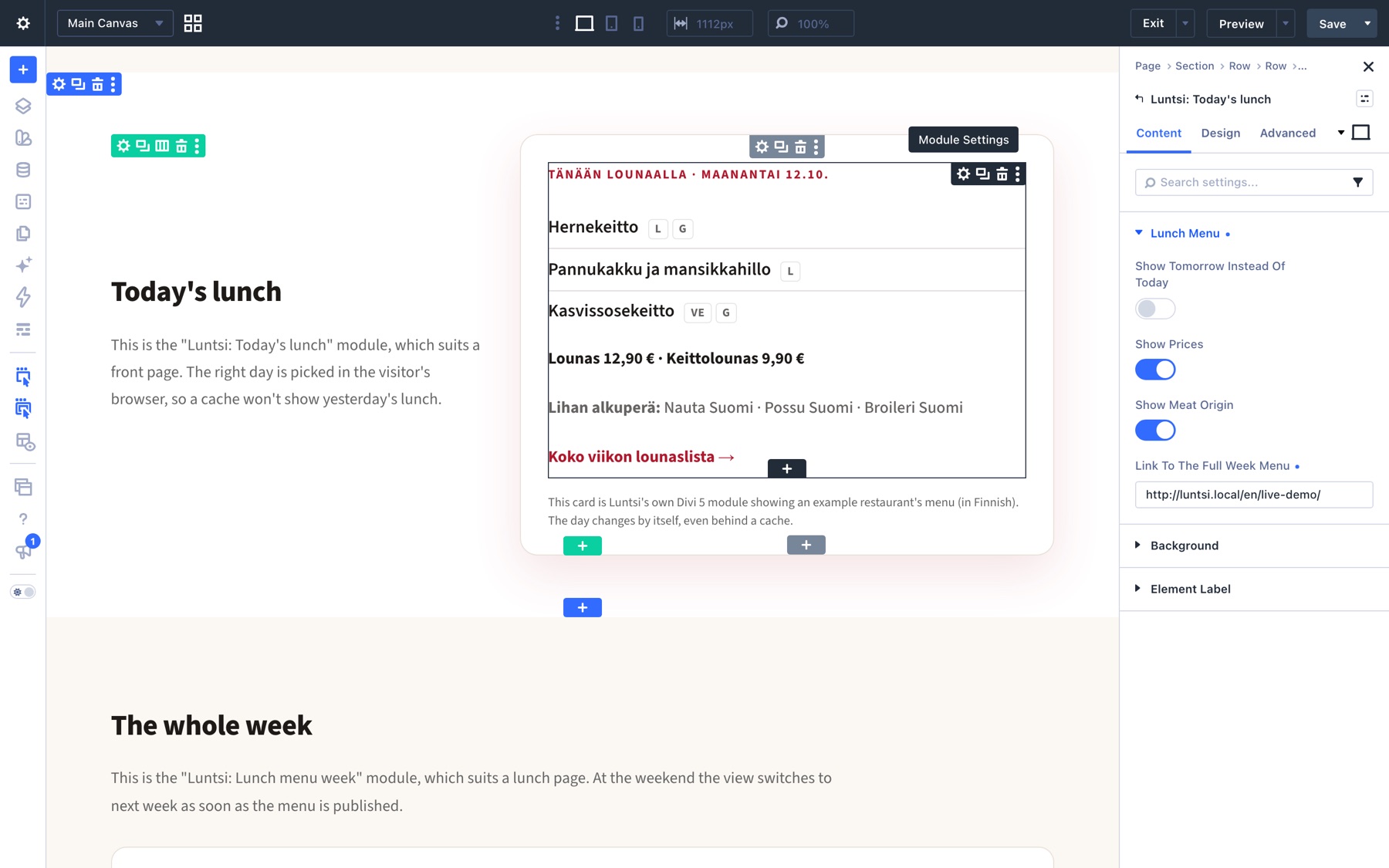
Content tab: the Lunch menu group's toggles (tomorrow, prices, meat origin) and the link to the full week. The module is selected on the canvas.
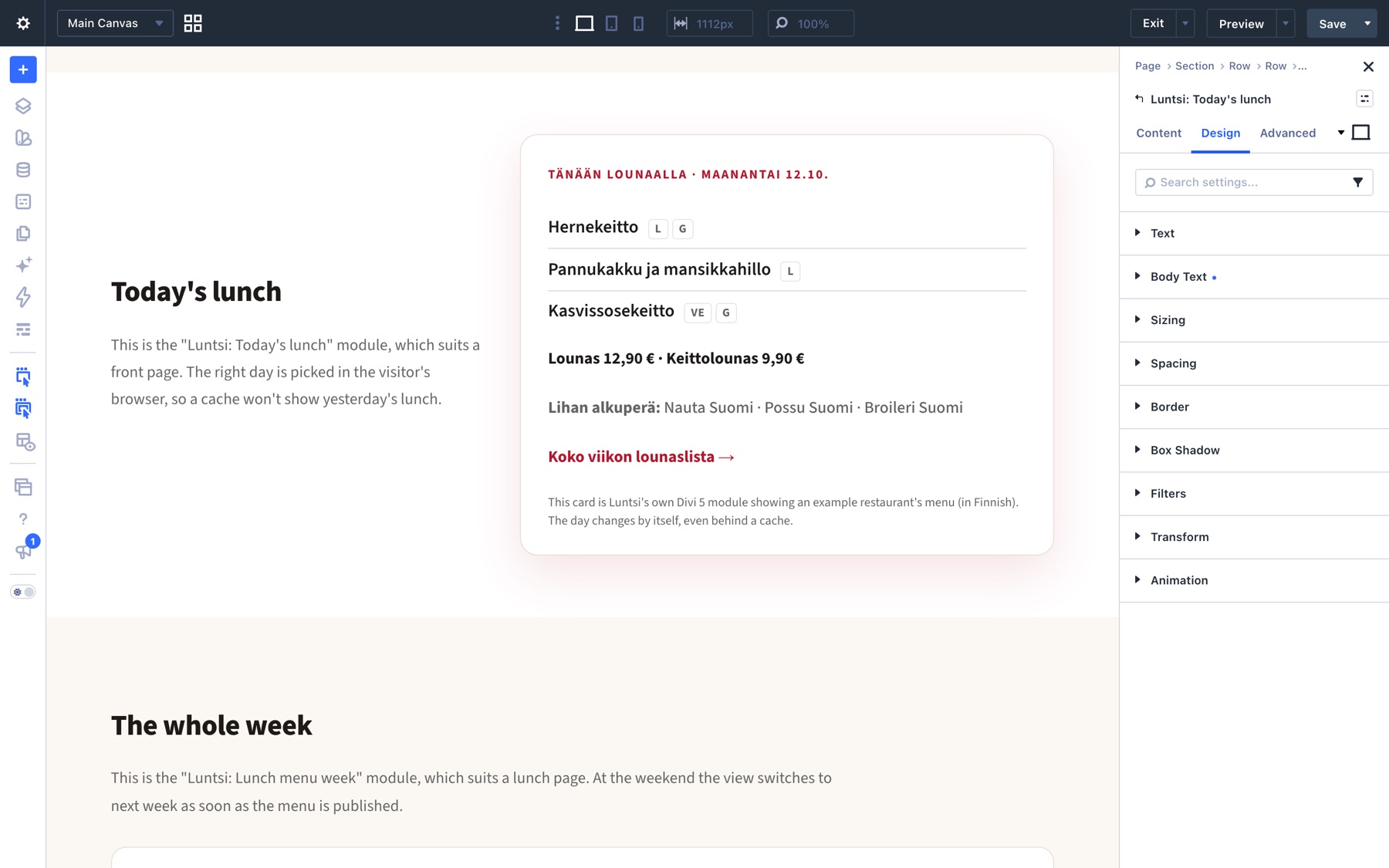
Design tab: Divi's standard groups Text, Body Text, Sizing, Spacing, Border, Box Shadow, Filters, Transform and Animation.
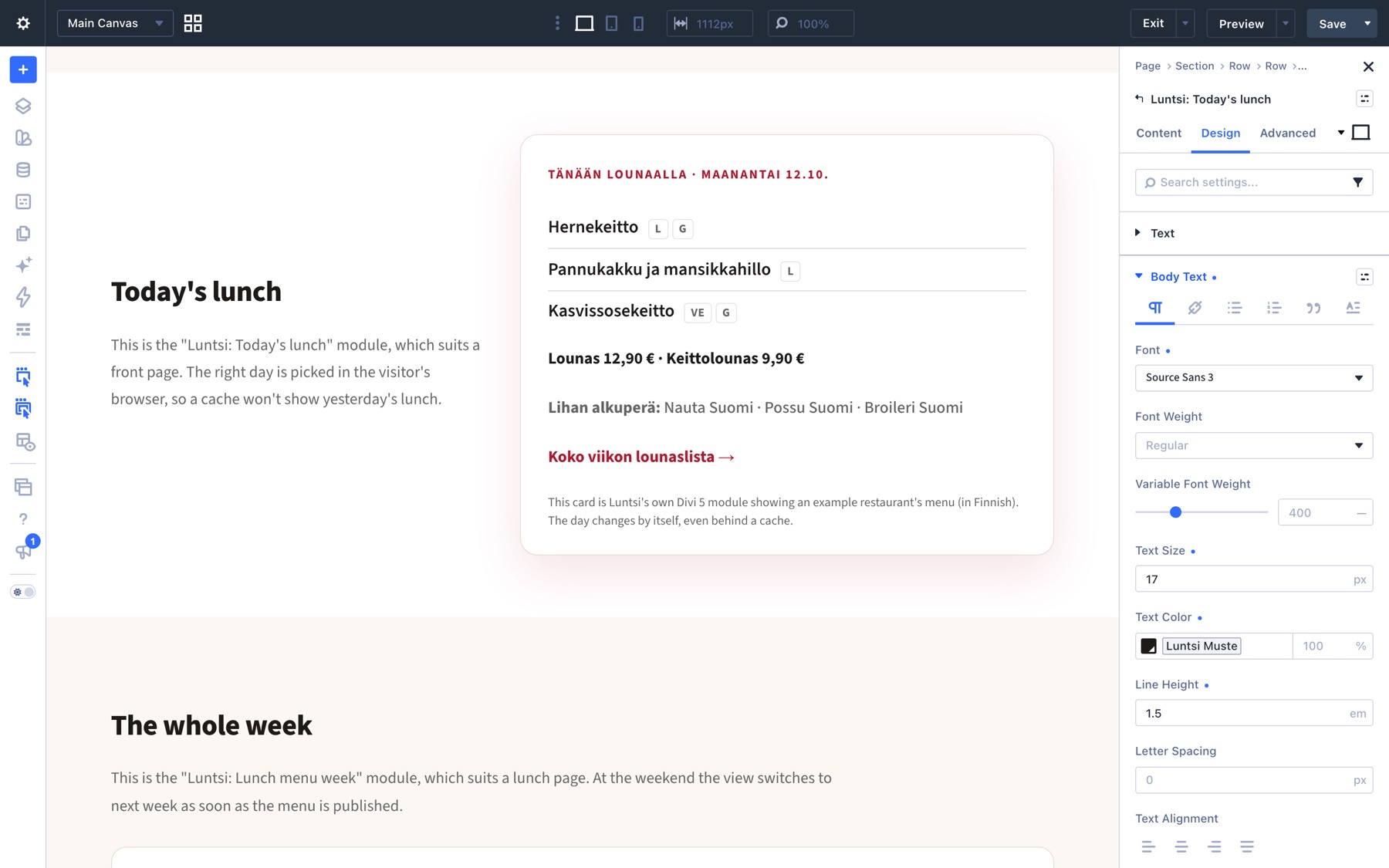
Body Text group open: font, size, colour from a global variable (Luntsi Muste), line height and letter spacing. The preview updates instantly.
Two modules
Today's lunch and Lunch menu week
Luntsi: Today's lunch
For the front page or a sidebar. Shows today's lunch, prices and meat origin; at the weekend the next lunch day. Settings: show tomorrow, show prices, show meat origin, link to the full week.
Luntsi: Lunch menu week
For the lunch page. The whole week day by day with today highlighted. When the week changes, the old menu hides itself. Setting: show info (prices, lunch hours, lunch includes).
Both modules are in the Visual Builder's module list under the search word "Luntsi". The right day is picked in the visitor's browser, so LiteSpeed Cache or any other page cache never shows yesterday's lunch.
For Divi 4 users
The native modules require Divi 5. In Divi 4 the same menu goes in with the shortcode in a Text or Code module:
[luntsi]                 today's lunch

[luntsi view="week"]     the whole week
Get your lunch menu sorted today
Luntsi is free and has no time limit. Install it, write the week and let the site do the rest.